
Skip to content
DeductFlow

BUILT FOR SHORT-TERM RENTAL OWNERS

Make every rental
deduction count.

Built for investors pursuing the short-term rental loophole and cost segregation. Keep your expenses, mileage, and participation records together so you can back up your tax strategy.

DeductFlow

Prove it.

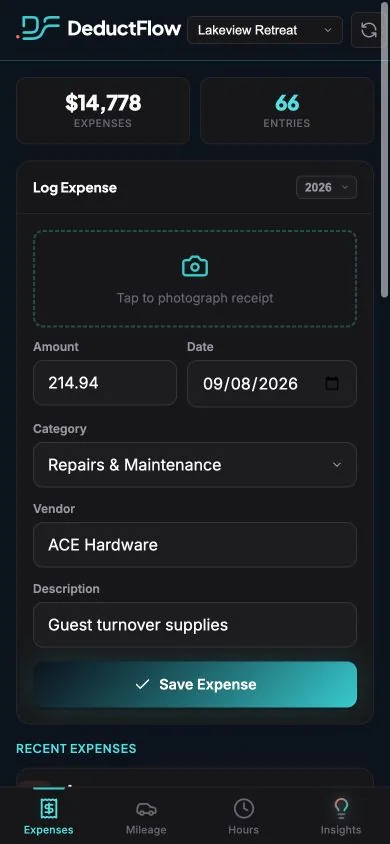
EXPENSESYou bought it.
Prove your purchase.
DeductFlow Mobile Companion expenses screen with fictional records
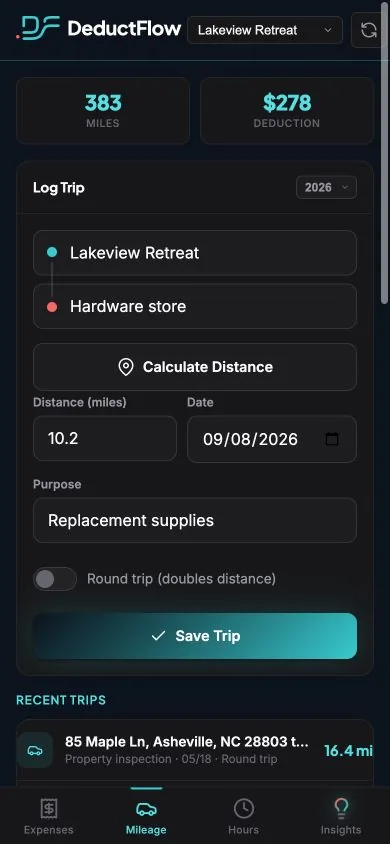
MILEAGEYou drove it.
Prove your trip.
DeductFlow Mobile Companion mileage screen with fictional records
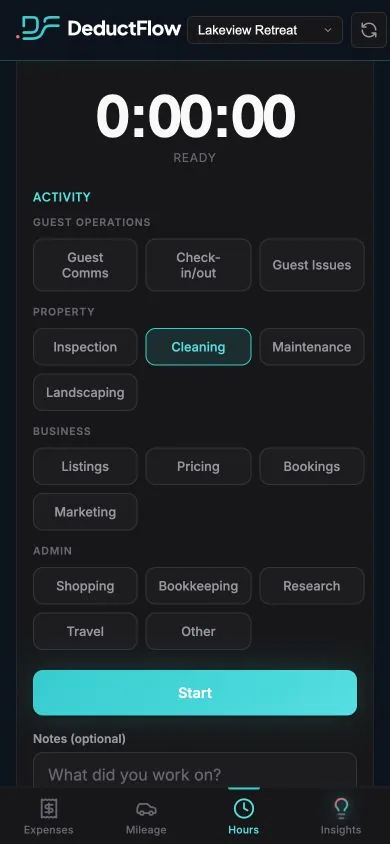
ACTIVE HOURSYou did it.
Prove when you worked.
DeductFlow Mobile Companion hours screen with a running timer and fictional records
DeductFlow

Prove it.

CPA REPORTS

Anyone can claim a deduction.
DeductFlowhelps you prove it.

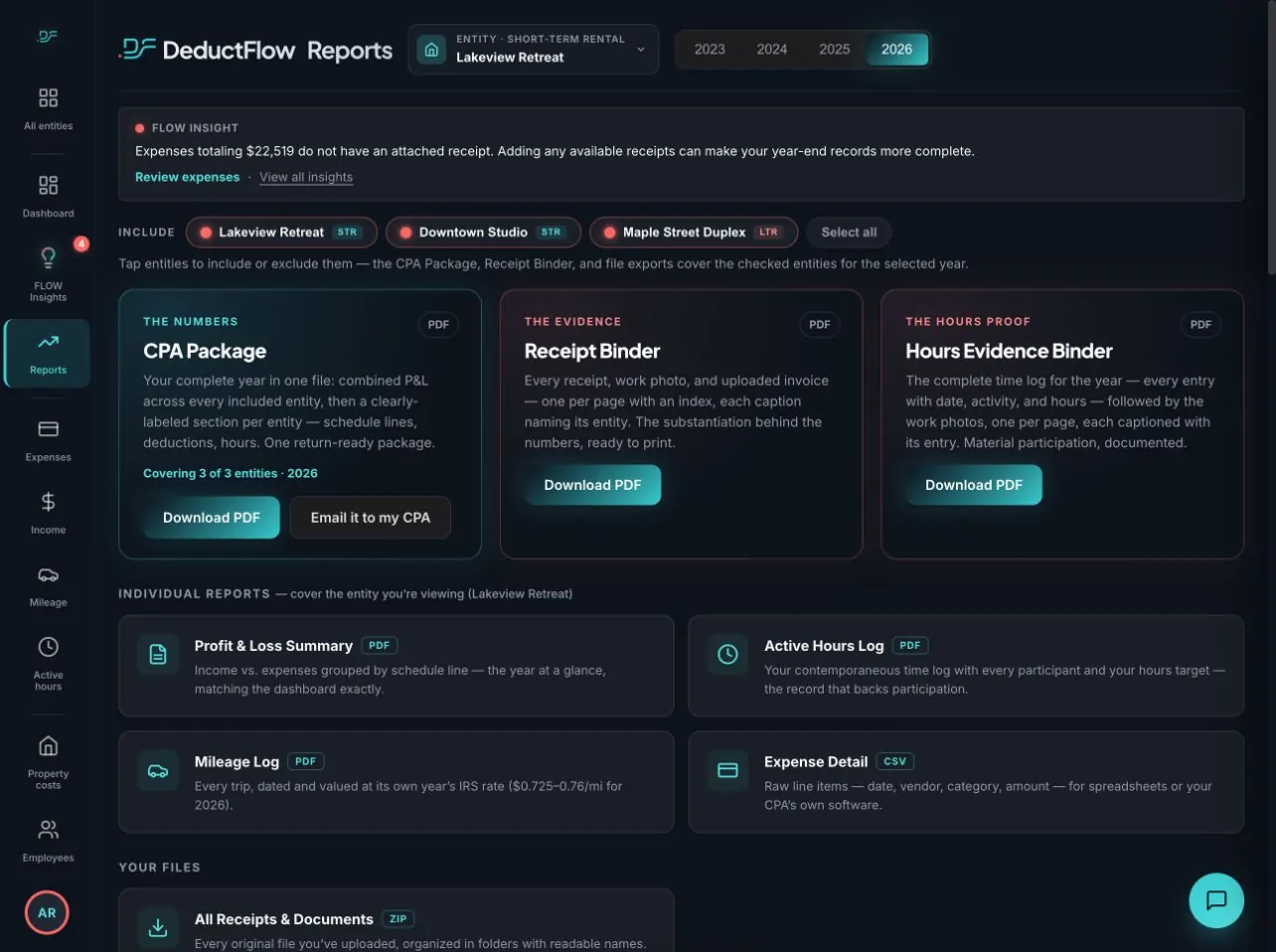
Give your CPA the records behind your STR tax strategy—organized by property, with the details behind each figure. Paid Pro reports organize records by entity and include recorded dates, routes, timer details, and supporting documents.

Your handoff, built into DeductFlow
Paid Pro · sample account
Paid Pro report and export options in DeductFlow, fictional demo account
When it was recorded

Recorded and updated dates stay with the entries.

What supports it

Routes, receipts, photos and timer details stay connected to the report.

When it changed

Editing an entry adds to its history instead of erasing it. Updated entries are marked.

DeductFlow organizes the record history. Your tax professional determines what qualifies and how it should be reported. Preview a sample CPA report →

HERE'S HOW DEDUCTFLOW HELPS

Run it smarter today.
Be ready at tax time.

From daily expenses to long-term assets: explore the tools behind your rental records. Screens show a fictional demo account.

01 / OVERVIEW

A clearer picture.
Better-informed decisions.

Review your recorded rental activity in one place. See spending, hours, and mileage together, then dig into the details that need your attention.

  • Switch between properties
  • See what you have recorded this year
  • Prepare your records for tax-time review

Run your rental with a clearer view of the numbers behind it.

Explore property management →
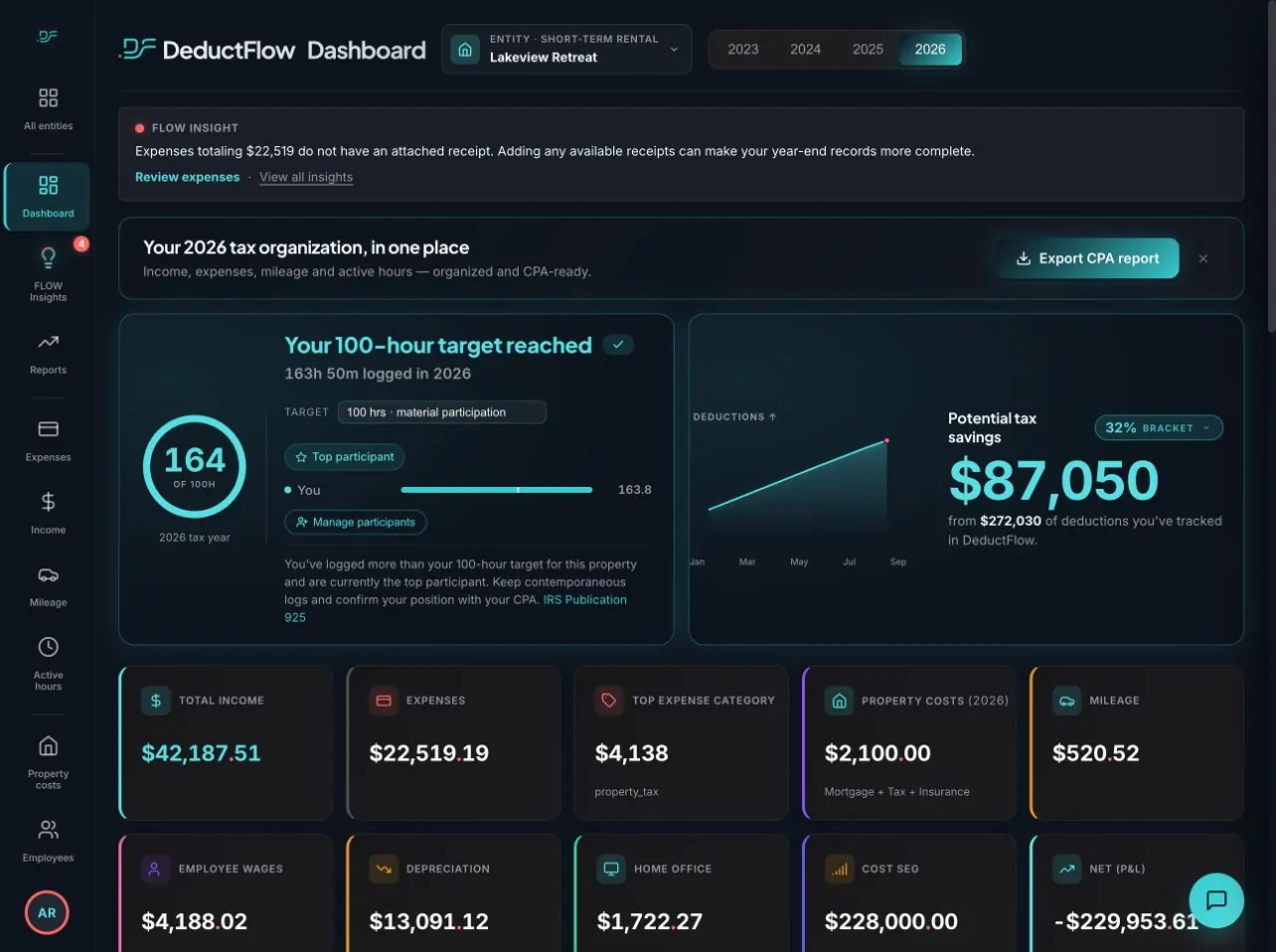
Overview / Lakeview RetreatSample data
Actual DeductFlow demo dashboard with rental activity and illustrative estimates

Actual app screen · fictional records, not a tax outcome.
02 / ACTIVE HOURS

You did it.
Prove when you worked.

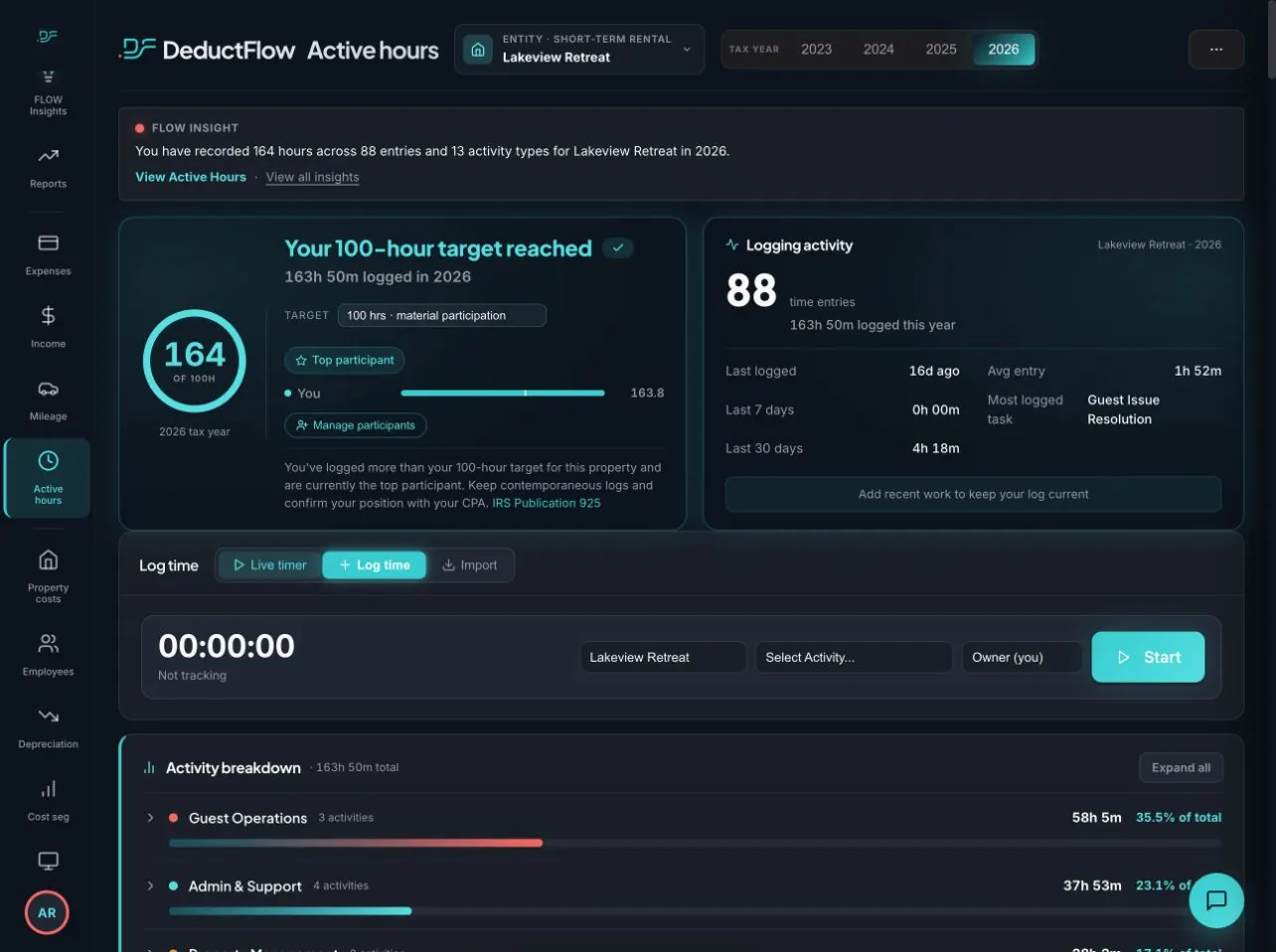
Keep the date the work happened separate from the date you recorded it.

Timer entries preserve their start and stop times. Later entries can say what they were based on (a calendar, a PMS log, messages, memory) instead of pretending every entry was made on the spot.

  • Activity date + a timestamp from when you logged it
  • Person, property, task, and duration
  • Timer times or “based on” context in your exports

Build the activity history behind a conversation about material participation.

Explore active hours →
Active hours / Lakeview RetreatSample data
Actual DeductFlow active hours screen showing recorded activity and a live timer

Actual app screen · fictional records, not a tax outcome.
03 / EXPENSES

You bought it.
Prove your purchase.

A receipt in your camera roll isn’t much help if you can’t remember what it belonged to.

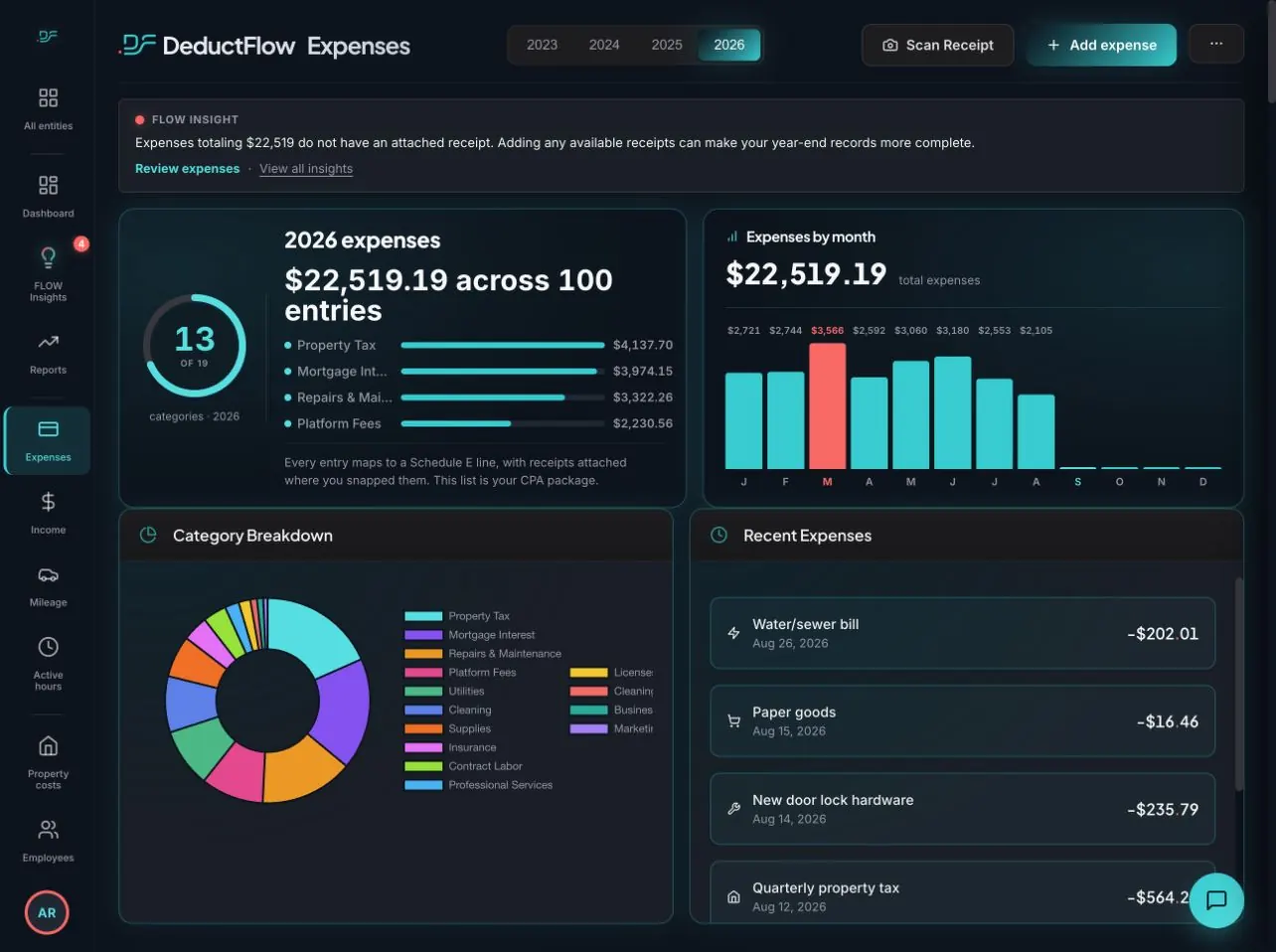
Keep the amount, vendor, property, category and receipt together. DeductFlow records when the expense and its file arrive, and keeps their history if something changes later.

  • See spending by category and property
  • Attach a receipt photo or file
  • Export the detail for your CPA

The expense stays with the receipt, and DeductFlow preserves the history behind both.

Explore expenses →
Expenses / Lakeview RetreatSample data
Actual DeductFlow expenses screen with categories and recent transactions

Actual app screen · fictional records, not a tax outcome.
04 / MILEAGE

You drove it.
Prove your trip.

Miles alone don’t tell much of a story. Six months later, “I think that was a supply run” is not much of a mileage record.

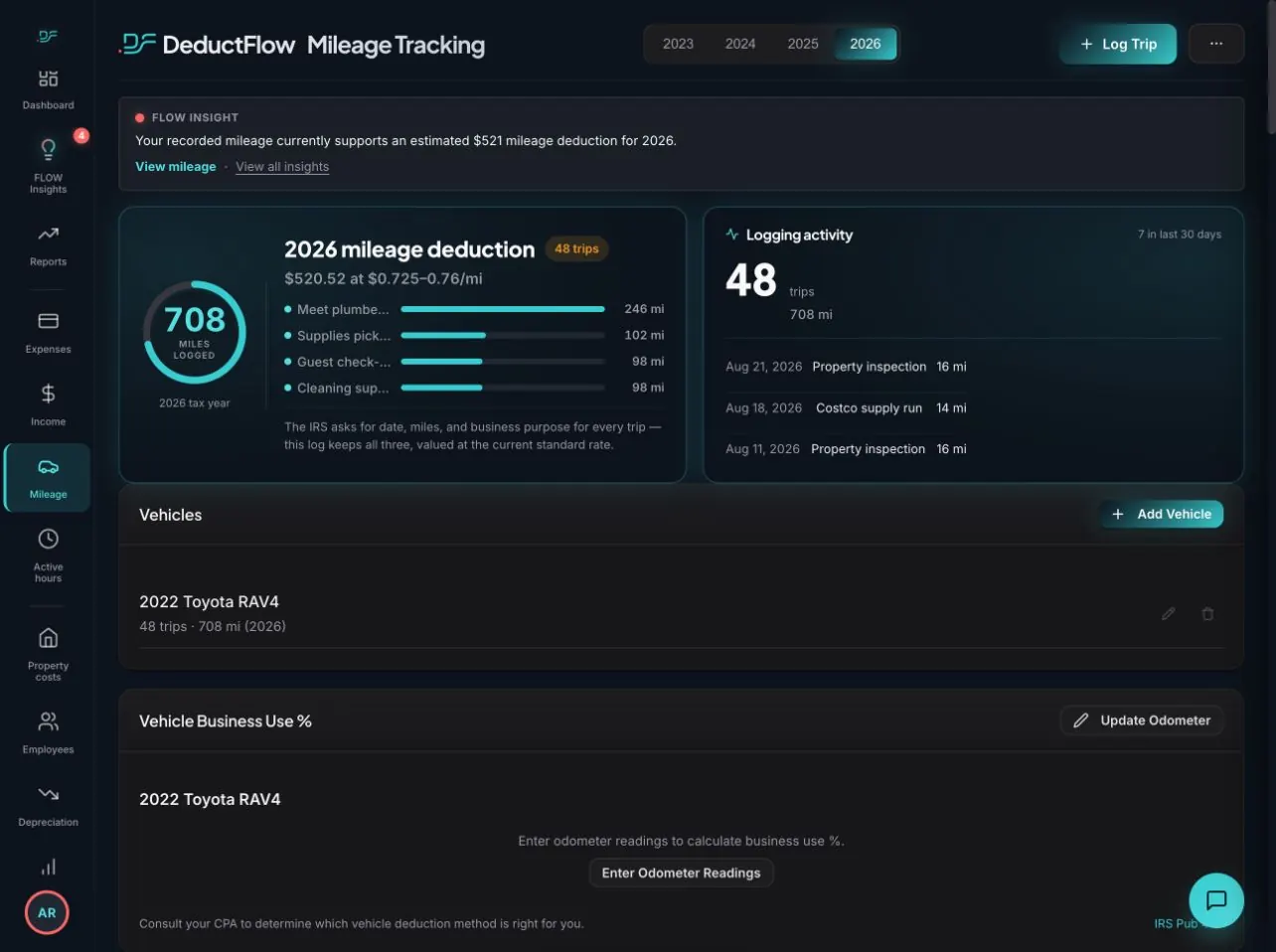
Keep the trip date, route, property and business purpose together, plus whether the distance came from Google Maps or was entered manually. If you override a Maps distance, DeductFlow keeps the original figure too.

  • Log the trip while you remember it
  • Maps or manual: the distance source stays on the record
  • Review rental mileage by property and year

Give your CPA the details to evaluate eligible rental travel expenses.

Explore mileage →
Mileage / Lakeview RetreatSample data
Actual DeductFlow mileage screen with recorded trips and illustrative mileage estimates

Actual app screen · fictional records, not a tax outcome.
05 / INCOME

See what came in.
Know where it came from.

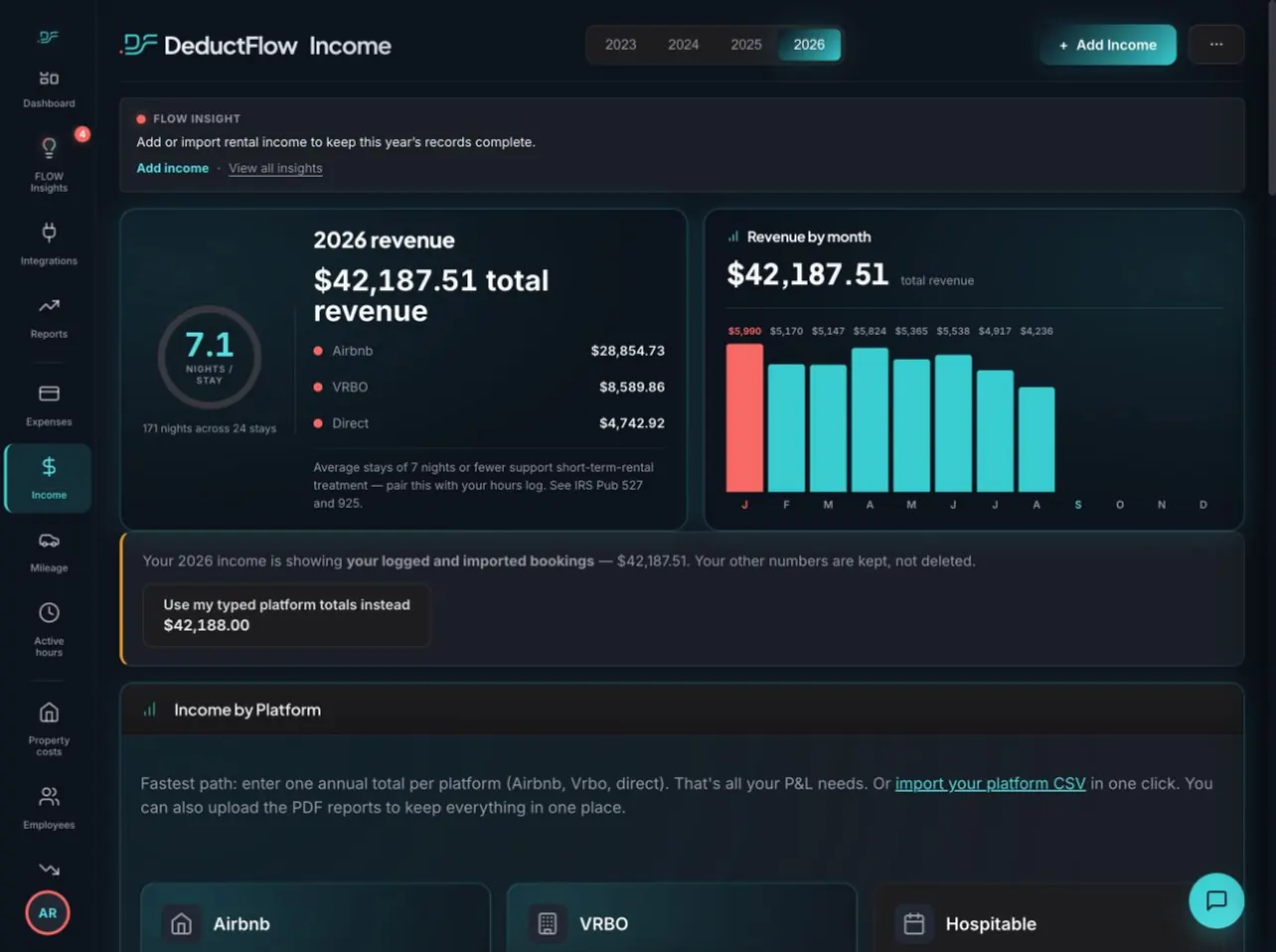
Connect Hospitable to import completed Airbnb stays into your rental income records. Add other income with platform totals, individual entries, or CSV imports, then review it alongside your costs.

  • Hospitable integration for Pro and trial accounts
  • Match listings to your DeductFlow properties
  • Track income by platform and review monthly revenue

Less retyping. A clearer picture of what each property earns. Direct and other-channel bookings still need another entry method.

Explore income →
Income / Lakeview RetreatSample data
Actual DeductFlow demo Income page with platform revenue and monthly totals

Actual app screen · fictional records, not a tax outcome.
06 / COST SEGREGATION

Your study.
Part of the bigger picture.

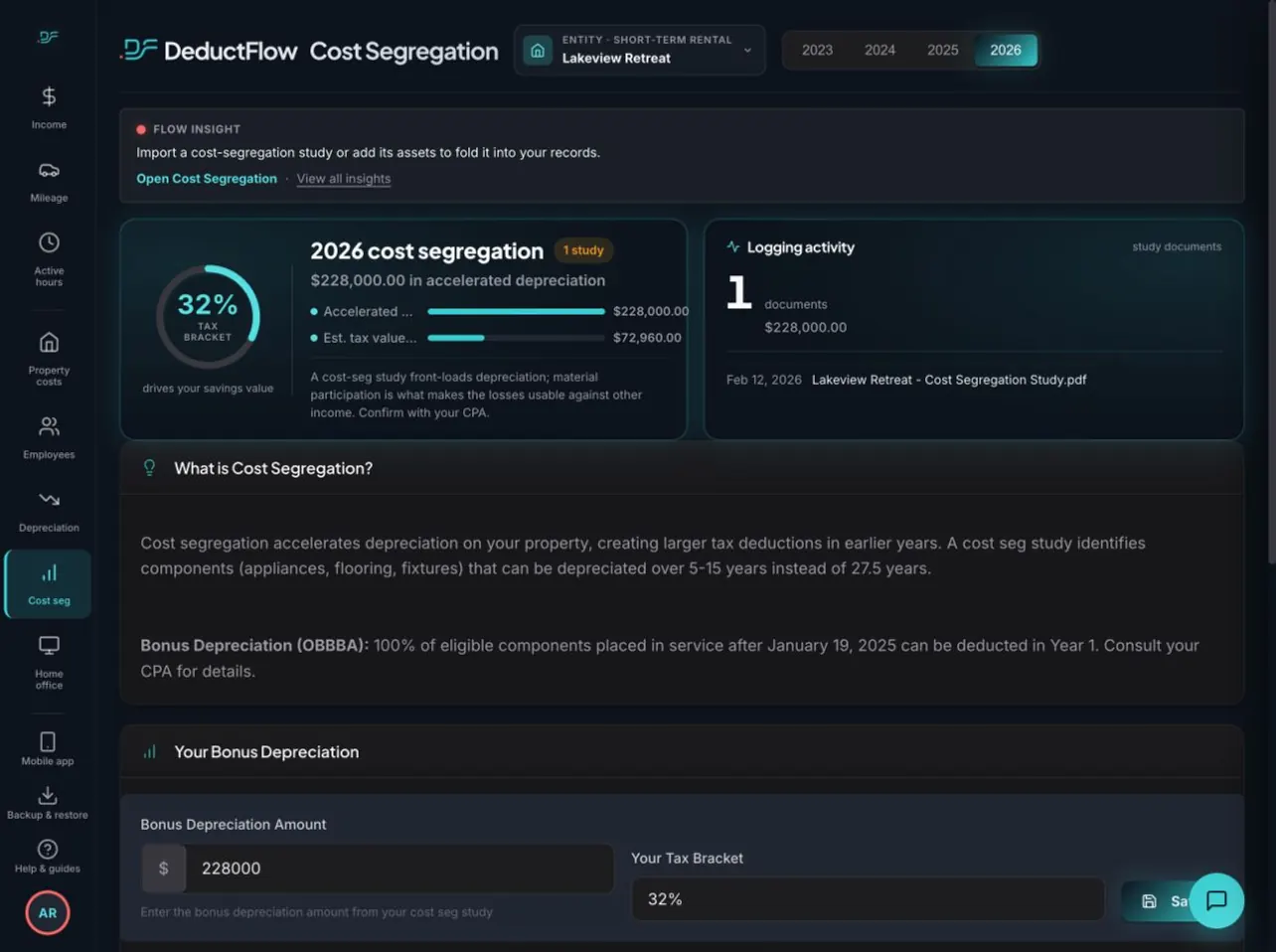
Keep your cost-segregation study with your property records. Record the bonus depreciation amount from your study and review its illustrative tax value with your CPA.

  • Store study documents with the property
  • Record the amount from your study
  • Review estimates using your selected tax bracket

Keep the supporting study close to the numbers it informs, not in a forgotten folder.

Explore cost segregation →
Cost segregation / Lakeview RetreatSample data
Actual DeductFlow demo Cost Segregation page with study documents and illustrative estimates

Actual app screen · fictional records, not a tax outcome.
07 / EMPLOYEES

The people you pay.
The work behind each payment.

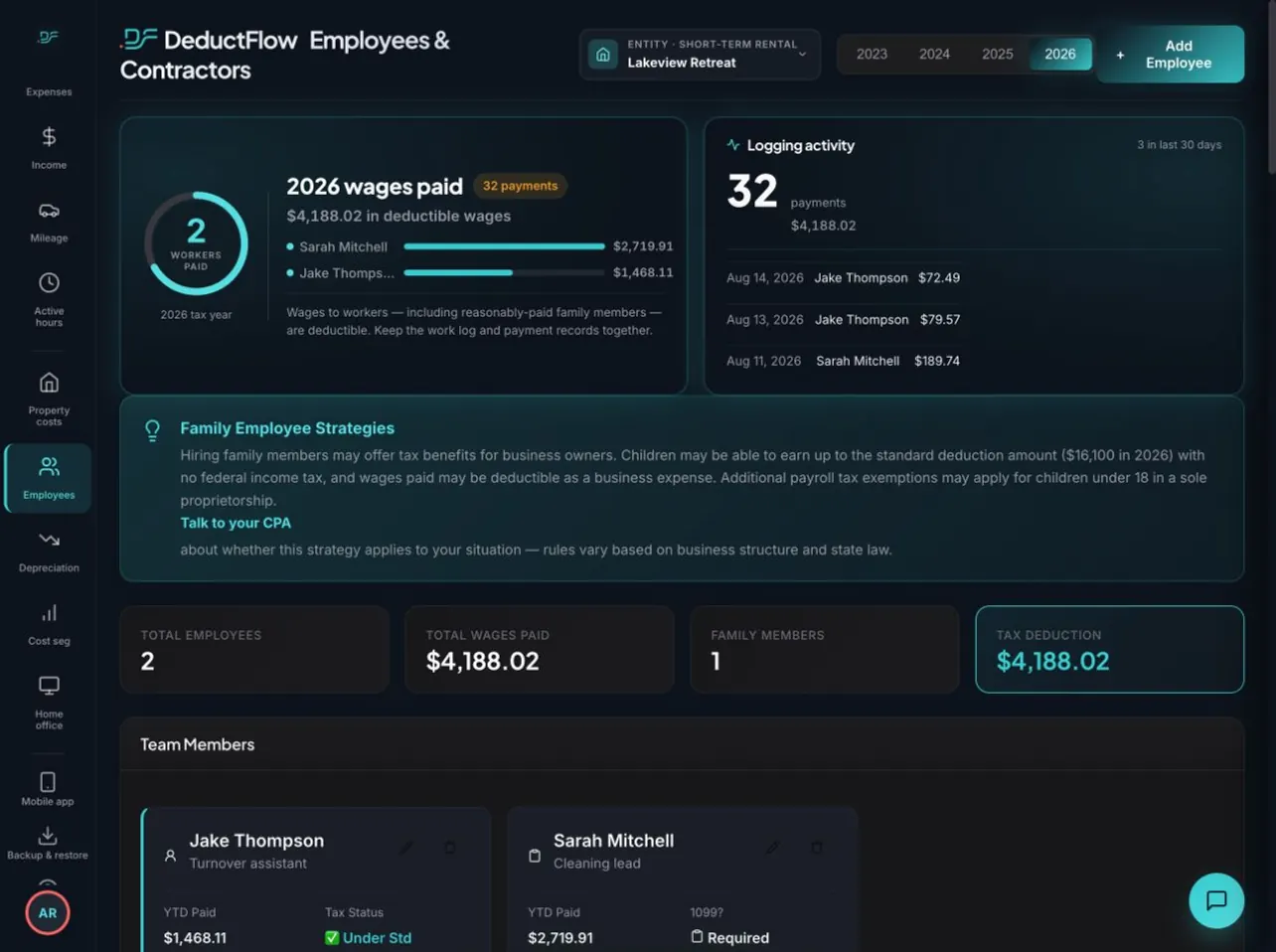
Track employees and contractors alongside your rental records. Keep payment dates, amounts, and the work performed together, so you can explain what each payment covered.

  • Keep team members organized by property
  • Log payments and work performed
  • Review year-to-date totals by worker

Keep the detail behind your labor costs ready for review.

Explore employees →
Employees / Lakeview RetreatSample data
Actual DeductFlow demo Employees and Contractors page showing team members and payment records

Actual app screen · fictional records, not a tax outcome.
08 / DEPRECIATION

Big purchases.
A longer-term record.

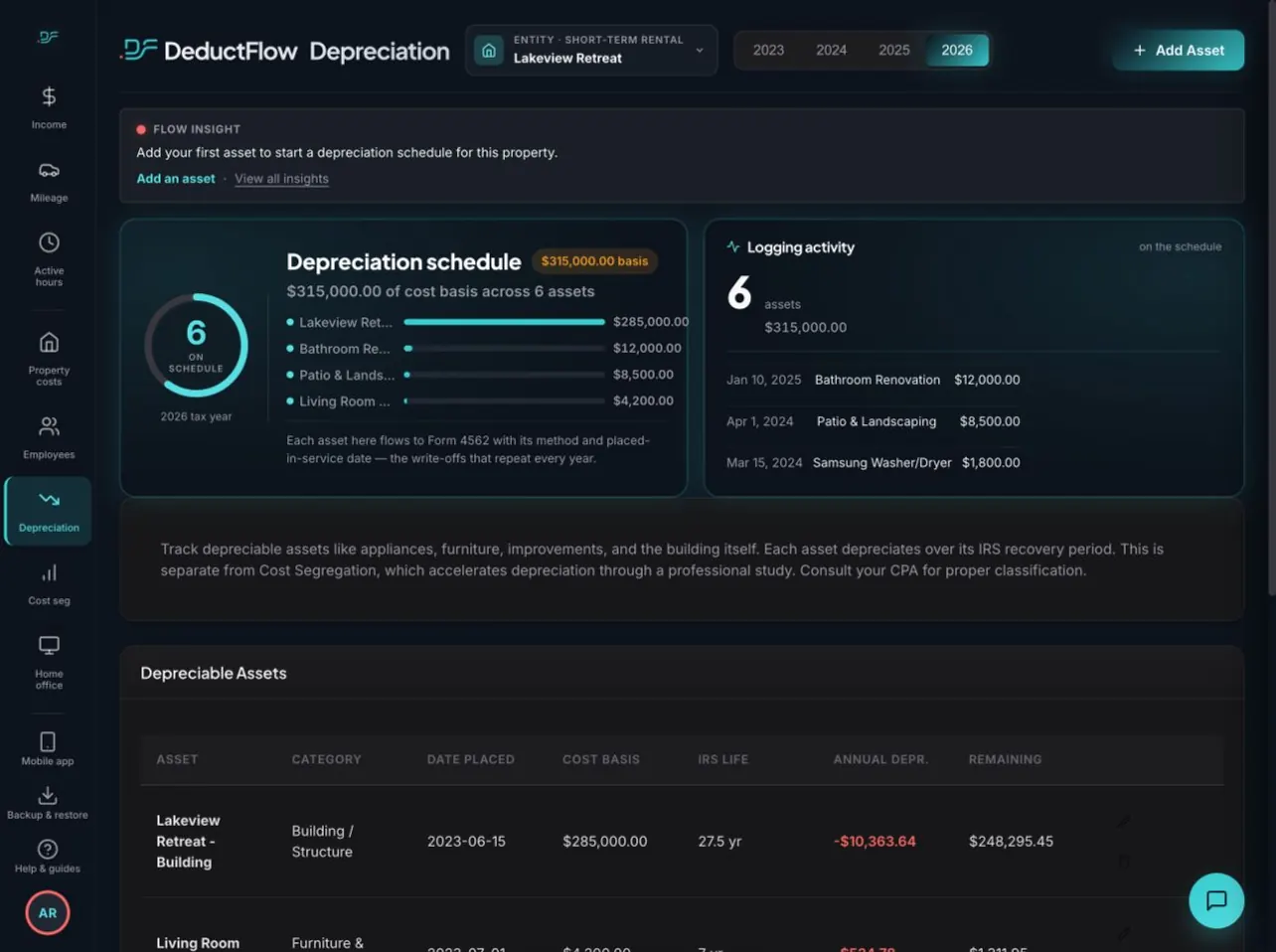
Track your building, improvements, furniture, and appliances in one asset schedule. Keep cost basis and placed-in-service dates with the depreciation details your CPA needs to review.

  • Organize assets by category
  • Keep cost basis and service dates
  • Review annual depreciation and remaining values

Keep long-lived rental investments in view beyond the year you bought them.

Explore depreciation →
Depreciation / Lakeview RetreatSample data
Actual DeductFlow demo Depreciation page with asset schedule and cost basis

Actual app screen · fictional records, not a tax outcome.

WHY NOT SPREADSHEETS?

Six months from now, could you back up that number?

A spreadsheet can hold your numbers and preserve edit history. You still have to build and maintain the process for keeping receipts, trip details, hours, and supporting files connected.

DeductFlow brings those pieces together. Keep the receipt with the expense, the purpose with the trip, and the activity details with the hours, organized by property. See when entries were recorded and changed. Give your CPA a clearer picture of the records behind your rental.

Less time piecing together your year. A clearer record to stand behind. DeductFlow. Prove it.

AICPA guidance on tax preparation explains how gathering client information and supporting documents upfront reduces time spent chasing missing details. DeductFlow helps rental owners keep those records together throughout the year.

THE JOBA SPREADSHEETDEDUCTFLOW
Keep expenses and receipts connectedMaintain rows, receipt links, and supporting files.Attach the receipt to the expense.
Find when entries were recorded or changedReview available file or cell history.Open the entry’s recorded history.
Document trips and workBuild and maintain mileage and activity logs.Dedicated trip and hours records with property, purpose, and activity details.
Prepare the CPA handoffAssemble property summaries and supporting records.Built-in reports and exports on paid Pro.

Read the full spreadsheet vs. software comparison →

Get the free hours and expense log → · Preview a sample CPA report →

Skyfall Chalet, the founder's short-term rental, surrounded by trees

WHY IT WAS BUILT

Three apps,
a spreadsheet,
and very little proof.

I started DeductFlow because tracking my own short-term rental took three apps. One for expenses. One for mileage. One for hours. The receipts didn’t have a home at all. None of it talked to the rest, so at tax time I stitched it together in a spreadsheet.

So I built one place for all of it. Then I found out what one place was really worth.

Timestamped hours and mileage turned out to matter more than I expected. A log made the day it happened carries weight that one rebuilt months later doesn’t. And with every expense, trip and hour together, I can see the whole business at once, property by property, with an estimate of what that tracking could mean at tax time.

It started as a way to get organized. It became the record I can stand behind.

Built by a short-term rental host

A CLEAR PRICE FOR A CLEARER RENTAL YEAR

Choose your plan.
Keep your rentals in view.

Start a free 7-day trial with your own expenses, hours, and mileage on desktop or in your phone browser. No credit card required. Then choose the plan that fits your properties.

FREE

Start with the basics.

$0 / Free plan

For a single property and lighter tracking.

Start free
  • 1 property
  • 50 expenses per year
  • 20 mileage entries total
  • Basic dashboard

Reports, exports, and Mobile Companion require paid Pro.

PRO · MONTHLY

All of Pro. Month to month.

$24 / month

Billed monthly. Cancel anytime.

Start your free 7-day trial

FREE 7-DAY TRIAL

  • Unlimited properties & expenses
  • Active hours & mileage tracking
  • Cost segregation & depreciation tools

UNLOCK WITH PAID PRO

  • Reports & exports
  • Mobile Companion

No credit card required for the trial. Reports, exports, and Mobile Companion require paid Pro.

A FEW GOOD QUESTIONS

Know what
you're getting.

The value, the details, and where your CPA fits in.

How does this help me make the most of deductions?

DeductFlow helps you keep potential deductions and their supporting records visible: expenses by category, receipts, rental trips, and activity logs. That gives you and your tax professional more organized information to review. It doesn't create eligibility or guarantee a particular tax result.

How does DeductFlow support the STR loophole and cost segregation?

DeductFlow helps you organize the records behind your short-term rental tax strategy. Track expenses and mileage, log the work you do for material-participation review, and keep your cost-segregation study with your property records. Your CPA evaluates eligibility and tax treatment.

Explore the STR loophole · Organize your cost-segregation records

What does DeductFlow mean by “Prove it.”?

“Prove it.” means keeping a history behind your rental records: when records were added, when they changed, what supporting files were attached, and, where available, how the record was created. DeductFlow does not determine whether a deduction qualifies, prove that an activity occurred, or guarantee a tax outcome.

What does “timestamped hours” mean?

For hours entries, DeductFlow timestamps when the entry first comes in, separately from the date you say the work happened. Your device clock can't change that date, and edits are added to the entry's history rather than replacing it. Reports show the recorded date alongside the activity date. Entries that existed before timestamping began are marked “on file” instead of being backdated. A timestamp documents when an entry was made; it doesn't independently verify the work.

Why track active hours as well as expenses?

Hours help document your participation in the rental. They are not themselves a dollar deduction, and reaching an hours target does not automatically establish tax eligibility. A clear activity history helps your tax professional review your circumstances.

Can I use my phone, and is mileage automatic?

Yes. The main web app works in your phone browser during the free 7-day trial. The separate Mobile Companion requires paid Pro and is not included in the trial. Mileage is logged by entering trip details and distance; DeductFlow does not automatically record trips with background GPS.

What is included in the free trial?

Try Pro's expense, active-hours, and mileage tracking with unlimited properties for 7 days on desktop or in your phone browser, without a credit card. Reports, exports, and the Mobile Companion require paid Pro and are not included in the trial or Free plan. Pro is $149 billed annually or $24 billed monthly. The Free plan supports one property with limited expense and mileage tracking; active hours is a Pro feature.

Does DeductFlow replace my CPA?

No. DeductFlow helps organize the records and reports behind your rental. Your tax professional determines eligibility, chooses the right treatment, and prepares your return.

DEDUCTFLOW

Prove it.

You invested in the strategy. Keep the records to back it up.

Start your free 7-day trial

No credit card required. Free plan available.